



















「Outlookを閉じます」を使用することで、PADからOutlookを閉じることができます。
Outlookを閉じます

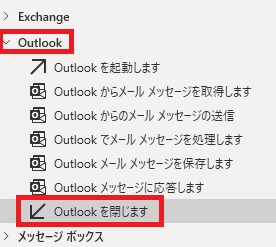
Outlookを閉じますは、アクションペインのOutlookから追加できます。

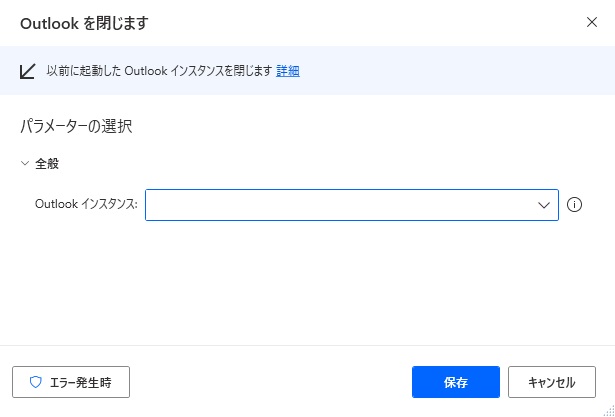
追加すると、ダイアログが表示されます。
Outlookインスタンス

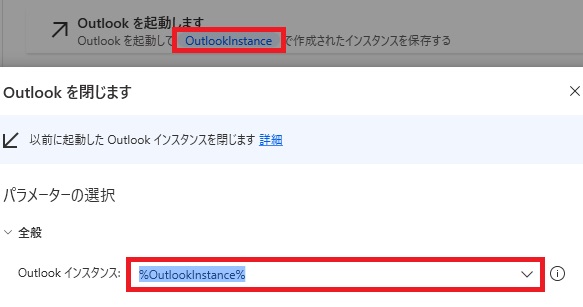
閉じるOutlookインスタンスを指定する必要があります=先にOutlookをPADから起動しておく必要があります(起動済みの状態で実行してもOK)。インスタンスがあれば自動でプリセットされます。
基本的な設定項目はこれだけです。実行するとOutlookが閉じます。
エラー発生時

左下のエラー発生時をクリックすると、
エラー時の処理を設定できます。
詳細ではOutlookインスタンスを閉じれない場合の処理を指定できます。
詳細ではOutlookインスタンスを閉じれない場合の処理を指定できます。


Microsoft Power Automate Desktop(PAD)アクション、使い方一覧
Power Automate Desktopの使い方を機能・分類別に参照できるまとめです。

sunagitsune.com
2021.11.16


コメント