




















リストを新規作成するアクションの使い方です。できることは空のリストを作るか、既存のリストを空にすることのみです。
新しいリストの作成

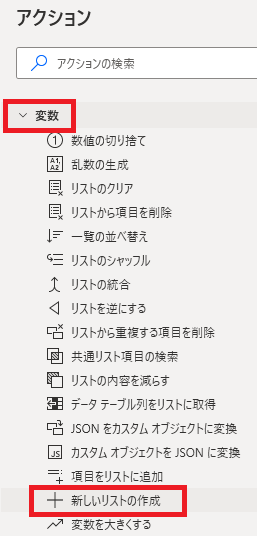
新しいリストの作成は、アクションペインの変数から追加できます。

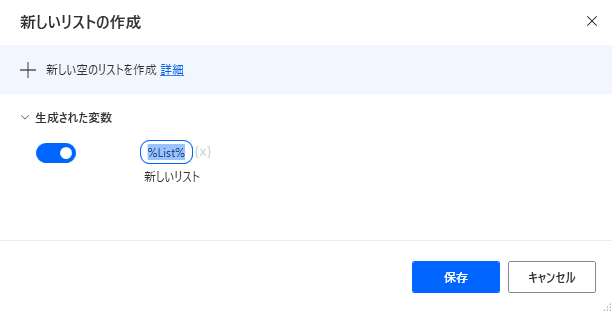
追加するとダイアログが表示されます。
生成された変数

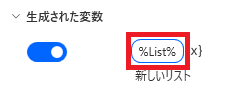
変数名をクリックするとリストの名前を変更できます。%は省略して書いても勝手につきます。

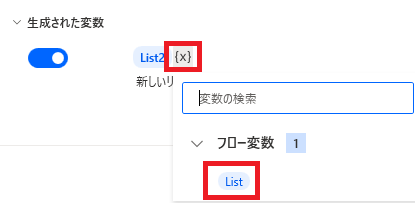
既にリストが存在する場合、{x}からリスト名を選ぶことで、既存のリストに空のリストを代入=リストをクリアできます。

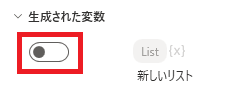
スイッチをオフにすると、変数を生成させないことができます。
関連記事



リストに値を追加する方法です。

リストから項目を削除する方法です。

リスト内の重複する項目を削除する方法です。

リストの項目の順序を逆にする方法です。

Microsoft Power Automate Desktop(PAD)アクション、使い方一覧
Power Automate Desktopの使い方を機能・分類別に参照できるまとめです。
sunagitsune.com
2021.11.16



コメント